When I was upskilling with Azure AI, I saw an opportunity on how to integrate it in Sitecore. Leveraging AI in Sitecore will significantly help different personas such as content author, marketer, visitors and end-users.
One of the POC I have created is to assist the content authors in generating creative ideas to speed up the writing process by inspiring new directions, generating image, and to easily translate content into multiple languages.
The contents retrieved from AI service will be copied directly into Sitecore’s Rich Text Editor. Below is the diagram on how the it flows from User interaction to Azure AI Services.

The following steps to integrate AI in RTE:
Prerequisites:
- Clone https://github.com/sitecorelabs/xmcloud-foundation-head
- Azure subscription
- Azure OpenAI service https://go.microsoft.com/fwlink/?linkid=2222006&clcid=0x409
- Obtain the Azure AI settings. I have created a settings in Sitecore to store these values:
- OpenAI Endpoint
- OpenAI Key
- Deployment Name
- DalleEndpoint
- Translator Endpoint
- Translator Key
- Nuget package to install:
- Azure.AI.OpenAI 1.0.0-beta.13
- Azure.Core 1.37 *add a bindings redirect in web.config to resolve version conflicts with Sitecore
- OpenAI 2.0.0-beta.5
- Create new Html Editor Profile
- Duplicate one of the Html Editor Profiles in core /sitecore/system/Settings/Html Editor Profiles. Rename it to Rich Text AI.
- In the Toolbar 1, add new Html Editor Button. Set a value in Click
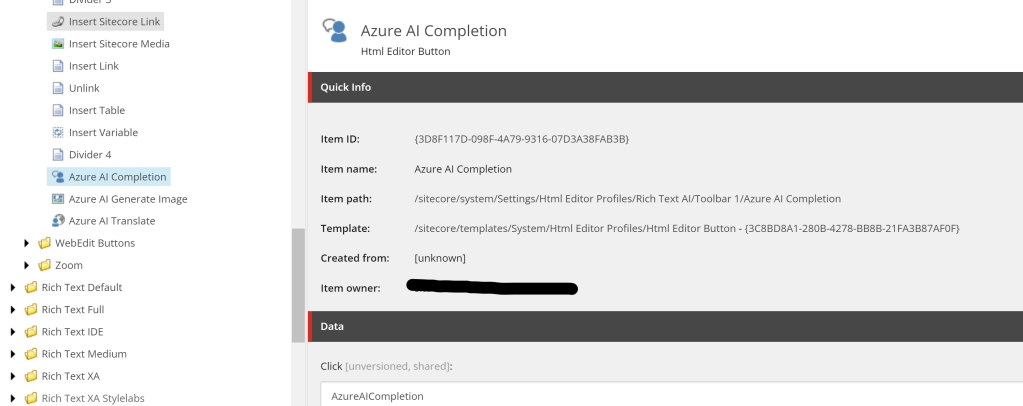
- Set the Source value to /sitecore/system/Settings/Html Editor Profiles/Rich Text AI of the Rich text field in Template
- Create a service that will call Azure AI services
- Chat GPT-4
- Dall-E
- Translator
   public async Task<string> CompleteChat(string userChatMessage)
   {
       var client = new Azure.AI.OpenAI.OpenAIClient(new Uri(endpoint), new AzureKeyCredential(key));
       var chatCompletionsOptions = new ChatCompletionsOptions()
       {
           Messages =
           {
               new ChatRequestSystemMessage("You are a helpful assistant that assists marketers and content authors."),
               new ChatRequestUserMessage("Hi, can you help me?"),
               new ChatRequestAssistantMessage("Absolutely. What can I do for you?"),
               new ChatRequestUserMessage(userChatMessage)
           },
           DeploymentName = deploymentName
       };
       Response<ChatCompletions> response = await client.GetChatCompletionsAsync(chatCompletionsOptions);
       ChatResponseMessage responseMessage = response.Value.Choices[0].Message;
       return responseMessage.Content;
   }

 public async Task<string> GenerateImage(string content)
 {
     using (var httpClient = new HttpClient())
     {
         var httpContent = new StringContent(content, Encoding.UTF8, "application/json");
         httpClient.DefaultRequestHeaders.TryAddWithoutValidation("api-key", key);
         ServicePointManager.Expect100Continue = true;
         ServicePointManager.SecurityProtocol = SecurityProtocolType.Tls12;
         var httpResponse = await httpClient.PostAsync(endpoint, httpContent);
         httpResponse.EnsureSuccessStatusCode();
         return await httpResponse.Content.ReadAsStringAsync();
     }
 }

 public async Task<string> TranslateContent(string languageCode, string textToTranslate)
 {
     string route = $"/translate?api-version=3.0&from=en&to={languageCode}";
     object[] body = new object[] { new { Text = textToTranslate } };
     var requestBody = JsonConvert.SerializeObject(body);
     string result = string.Empty;
     using (var client = new HttpClient())
     using (var request = new HttpRequestMessage())
     {
         request.Method = HttpMethod.Post;
         request.RequestUri = new Uri(endpoint + route);
         request.Content = new StringContent(requestBody, Encoding.UTF8, "application/json");
         request.Headers.Add("Ocp-Apim-Subscription-Key", key);
         request.Headers.Add("Ocp-Apim-Subscription-Region", location);
         HttpResponseMessage response = await client.SendAsync(request).ConfigureAwait(false);
         result = await response.Content.ReadAsStringAsync();
     }
     return result;
}- Create a web api that will call the services
 [HttpPost]
 [Route("api/rte/complete")]
 public async Task<HttpResponseMessage> Complete([FromBody] PromptRequest request)
 {
     try
     {
         var ai = new Completion(new AzureAISettings
         {
             OpenAIEndpoint = settingsItem.Fields["OpenAIEndpoint"]?.Value,
             OpenAIKey = settingsItem.Fields["OpenAIKey"]?.Value,
             DeploymentName = settingsItem.Fields["DeploymentName"]?.Value
         });
         var text = await ai.CompleteChat(request.Prompt);
         return Request.CreateResponse(HttpStatusCode.OK, text);
     }
     catch (Exception ex)
     {
         throw new Exception("Cannot complete the request.", ex);
     }
 }

[HttpPost]
[Route("api/rte/generateimage")]
public async Task<HttpResponseMessage> GenerateImage([FromBody] PromptRequest request)
{
    var ai = new Image(new AzureAISettings
    {
        DalleEndpoint = settingsItem.Fields["DalleEndpoint"]?.Value,
        OpenAIKey = settingsItem.Fields["OpenAIKey"]?.Value,
    });
    var content = JsonConvert.SerializeObject(request);
    var text = await ai.GenerateImage(content);
    var response = JsonConvert.DeserializeObject<GenerateImageResponse>(text);
    try
    {
        var aiImage = ai.GetImage(response.Data.FirstOrDefault()?.Url);
        //convert the returned URL into byte
        //save image to media library
        //assemble the htmltag
        response.HtmlTag = @"<img src=""" + mediaItemUrl + @""" alt=""" + request.Prompt + @""">";
    }
    catch (Exception ex)
    {
        return Request.CreateResponse(HttpStatusCode.OK, ex.Message);
    }
    return Request.CreateResponse(HttpStatusCode.OK, response);
}

[HttpPost]
[Route("api/rte/translate")]
public async Task<HttpResponseMessage> Translate([FromBody] TranslationRequest request)
 {
     try
     {
         var ai = new Translate(new AzureAISettings
         {
             TranslatorEndpoint = settingsItem.Fields["TranslatorEndpoint"]?.Value,
             TranslatorKey = settingsItem.Fields["TranslatorKey"]?.Value,
             TranslatorLocation = settingsItem.Fields["TranslatorLocation"]?.Value
         });
         var translationResponse = await ai.TranslateContent(request.LanguageCode, request.TextToTranslate);
         var translationResult = Newtonsoft.Json.JsonConvert.DeserializeObject<List<TranslationResponse>>(translationResponse);
         if (translationResult != null && translationResult.Any())
         {
             var translatedText = translationResult.FirstOrDefault()?.Translations.FirstOrDefault()?.Text;
             return Request.CreateResponse(HttpStatusCode.OK, translatedText);
         }
         else
         {
             throw new Exception("Translation result not found.");
         }
     }
     catch (Exception ex)
     {
         throw new Exception("Cannot complete the request.", ex);
     }
}- Override RichText Command.js. The file is located in sitecore/shell/Controls/Rich Text Editor
async function complete(prompt) {
    var apiUrl = "/api/rte/complete";
    var data = {
        prompt: prompt
    };
    var fetchOptions = {
        method: 'POST',
        headers: {
            'Content-Type': 'application/json'
        },
        body: JSON.stringify(data)
    };
    try {
        const response = await fetch(apiUrl, fetchOptions);
        if (!response.ok) {
            throw new Error('Network response was not ok');
        }
        const jsonResponse = await response.json();
        return jsonResponse;
    } catch (error) {
        throw error;
    }
}

Telerik.Web.UI.Editor.CommandList["AzureAICompletion"] = async function (commandName, editor, args) {
    var userInput = prompt("Prompt Azure AI to help you write a marketing content.", "");
    if (userInput.length > 0) {
        try {
            var response = await complete(userInput);
            editor.pasteHtml(response);
        } catch (error) {
            throw error;
        }
    }
    else {
        alert("Please enter a prompt message.");
    }
};

async function generateImage(prompt) {
    var apiUrl = "/api/rte/generateimage";
    var data = {
        prompt: prompt
    };
    var fetchOptions = {
        method: 'POST',
        headers: {
            'Content-Type': 'application/json'
        },
        body: JSON.stringify(data)
    };
    try {
        const response = await fetch(apiUrl, fetchOptions);
        if (!response.ok) {
            throw new Error('Network response was not ok');
        }
        const jsonResponse = await response.json();
        return jsonResponse;
    } catch (error) {
        throw error;
    }
}

Telerik.Web.UI.Editor.CommandList["AzureAIGenerateImage"] = async function (commandName, editor, args) {
    var userInput = prompt("Prompt Azure AI to generate image.", "");
    if (userInput.length > 0) {
        try {
            document.body.style.cursor = 'wait';
            var response = await generateImage(userInput);
            editor.pasteHtml(response.tag);
            document.body.style.cursor = 'default';
        } catch (error) {
            throw error;
        }
    }
    else {
        alert("Please enter a prompt message.");
    }
};
async function translateText(languageCode, textToTranslate) {
    var apiUrl = "/api/rte/translate";
    var data = {
        languageCode: languageCode,
        textToTranslate: textToTranslate
    };
    var fetchOptions = {
        method: 'POST',
        headers: {
            'Content-Type': 'application/json'
        },
        body: JSON.stringify(data)
    };
    var translatedText = "";
    try {
        const response = await fetch(apiUrl, fetchOptions);

        if (!response.ok) {
            throw new Error('Network response was not ok');
        }
        const jsonResponse = await response.json();
        const translatedText = jsonResponse;
        return translatedText;
    } catch (error) {
        throw error;
    }
}

Telerik.Web.UI.Editor.CommandList["AzureAITranslate"] = async function (commandName, editor, args) {
    var selection = editor.getSelection();
    var selectedText = jQuery.trim(selection.getText());
    if (selectedText.length > 0) {
        try {
            var translatedText = await translateText(scLanguage, selectedText);
            editor.pasteHtml(translatedText);
        } catch (error) {
            throw error;
        }
    }
    else {
        alert("Please select a text to translate.");
    }
};
6. Update RadEditor.Tools.resx to set the tooltip text in Azure AI buttons
Important Considerations:
- Ensure Azure AI packages and dependencies versions are compatible with Sitecore XM Cloud.
- Azure OpenAI service is not open to everyone. Need to obtain an approval based on your intended usage before you can use Azure OpenAI.
- Some Azure OpenAI packages are still on preview/beta release. The documentation from Microsoft on how to use them are outdated, and I have to go through all beta versions to see which one is compatible. Refer to the prerequisites for the version I’ve used on this POC.
I also tried to create a chat page that is using a knowledge base (BYOD), document intelligence to scan a document and extract the key information then prefill a Sitecore form. The approach is also the same where the front-end is calling the web api which then calls a service to invoke Azure AI service.
There are more things I wanted to explore such as embedding copilot, OrderCloud integration with Microsoft Fabric, AI-powered content migration. So stay tuned!
 Sitecore Overflow
Leave a comment