Workflow comment editor OOTB only provides a field to add a comment. Follow the steps to customize the workflow comments editor.
- Create a custom comment template
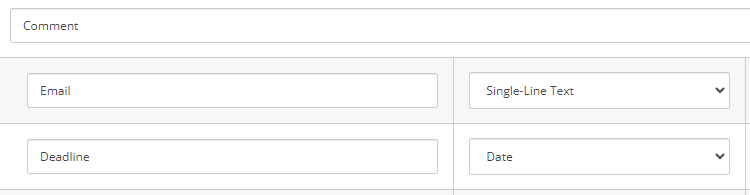
- Add the Standard Comment template as a base template
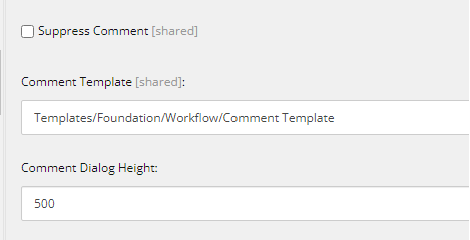
- In the Workflow Command, set the custom comment template
If you need to pre-fill one of the fields, such as email you need to override the Sitecore.sitecore.shell.Applications.Workbox.CommentEditor
- Add a new class then implement Comment Editor
public class CustomCommentEditor : CommentEditor
    {
        protected override void RestoreFieldValues()
        {
            try
            {
                if (ItemUriTexts == null || ItemUriTexts.Count > 1)
                {
                    return;
                }

                string itemUriText = ItemUriTexts.FirstOrDefault();
                Item item = GetCurrentItem();
                if (item == null)
                {
                    Log.Warn($"CustomCommentEditor: Cannot find item. {itemUriText}", this);
                    return;
                }

                //Get values from registry by default
                string registryKey = GetRegistryKey(itemUriText);
                string @string = Registry.GetString(registryKey, string.Empty);
                if (!string.IsNullOrEmpty(@string))
                {
                    IEnumerable<KeyValuePair<string, string>> values = JsonConvert.DeserializeObject<IEnumerable<KeyValuePair<string, string>>>(@string);

                    Sitecore.Collections.StringDictionary stringDictionary = new Sitecore.Collections.StringDictionary(values);
                    SetValue(item, stringDictionary);

                    return;
                }
                SetValue(item, null);
            }

            catch (Exception ex)
            {
                Log.Error($"CustomCommentEditor throws an error., {ex}", this);
                SheerResponse.ShowError("Comment Editor failed to load.", ex.Message);
            }
        }

        private void SetValue(Item item, Sitecore.Collections.StringDictionary stringDictionary)
        {
            foreach (FieldInfo fieldValue in base.FieldInfo.Values)
            {
                if (stringDictionary != null && !stringDictionary.ContainsKey(fieldValue.FieldID.ToString()))
                {
                    continue;
                }

                System.Web.UI.Control control = Context.ClientPage.FindSubControl(fieldValue.ID);
                if (control != null)
                {
                    var value = stringDictionary != null ? stringDictionary[fieldValue.FieldID.ToString()] : string.Empty;

                    //If comment template has email field then get it from current item
                    if (fieldValue.FieldID == Templates.System.Comments.Fields.Email)
                    {
                        // add your logic here to pre-fill email
                        value = ""
                    }

                    if (control is IContentField)
                    {
                        (control as IContentField).SetValue(value);
                    }
                    else
                    {
                        ReflectionUtil.SetProperty(control, "Value", value);
                    }
                }
            }
        }

        private Item GetCurrentItem()
        {
            string itemUriText = ItemUriTexts.FirstOrDefault();
            var itemId = Regex.Match(itemUriText, @"[{(]?[0-9A-F]{8}[-]?([0-9A-F]{4}[-]?){3}[0-9A-F]{12}[)}]?");
            if (itemId.Success)
            {
                return Client.ContentDatabase.GetItem(itemId.Value);
            }
            return null;
        }
    }
- Modify sitecore/shell/Applicatons/Workbox/CommentEditor.aspx to assign the CodeBeside
<body runat="server" id="Body">
     <form id="ContentEditorForm" style="" runat="server">
        <sc:CodeBeside ID="CodeBeside1" runat="server" Type="MyProject.Foundation.Workflow.Workbox.CustomCommentEditor, MyProject.Foundation.Workflow" />
 Sitecore Overflow
Leave a comment